
Meet Sarah.
She’s a senior developer at a mid-sized SaaS company. Smart. Experienced. Capable.
Her CTO asked her to document their microservices architecture.
“Should be straightforward,” he said. “Just write down how it works.”
Three months later, the documentation is still outdated.
This is Sarah’s story. But it’s also the story of thousands of developers caught in the same trap: documentation rot. The moment you finish writing it, it’s already wrong.
The Challenge
The Request: “Sarah, we need documentation for our microservices architecture. New developers are struggling to onboard, and we’re losing too much time explaining how things work. Can you handle this?”
Sarah’s Initial Thought: “Sure, I can do this. I’ll start with the core services and work my way out. Should take a few weeks.”
The Reality: Three months later, Sarah is still working on it. And the documentation she’s already written is outdated.
Her CTO expected this to take 2-3 weeks. It’s taken 3 months. She’s exhausted. The documentation is incomplete. And worst of all—nothing stays current.
Why? Because documentation isn’t a one-time task. It’s a race against code velocity. And code always wins.
The 7 Real Documentation Challenges
Sarah discovered that documenting a microservices architecture isn’t about writing better. It’s about battling seven interconnected challenges simultaneously.
Challenge 1: Document Every Service (And There Are Always More)
The scope:
- 12 microservices
- Each with different tech stacks
- Multiple databases, message queues, cron jobs, third-party integrations
- Hundreds of functions, API endpoints, deployment strategies
For each service, Sarah needs to document:
- What does it do?
- How does it work internally?
- What dependencies does it have?
- How does it interact with other services?
- What APIs does it expose?
- What data does it store?
Time per service: 10-15 hours
Total time for 12 services: 120-180 hours
Sarah’s reaction: “I didn’t realize how complex our architecture had become. Every service has its own quirks, dependencies, and undocumented decisions. I’m documenting code I didn’t write, making assumptions about decisions I wasn’t part of.”
Challenge 2: Create and Maintain Visual Diagrams
What’s needed:
- Architecture diagrams (how services connect at the system level)
- Sequence diagrams (how services interact in a workflow)
- Data flow diagrams (how data moves through the system)
The manual nightmare:
- Learn diagram tools (Lucidchart? Draw.io? PlantUML?)
- Spend 3-6 hours creating one diagram
- Diagram changes when code changes
- Manually recreate the diagram
- Repeat forever
Sarah’s painful experience: “I spent 3 hours creating a sequence diagram for the payment flow. Two days later, we refactored the flow. The diagram is already outdated. Do I recreate it? When? The code is going to change again next week.”
Challenge 3: Synchronize With Code Changes
The brutal truth:
- Code changes daily (50+ commits per week)
- Documentation updates are manual and time-consuming
- No automatic sync mechanism between code and docs
- Developers forget to update docs when they ship code
- Documentation falls behind within weeks, not months
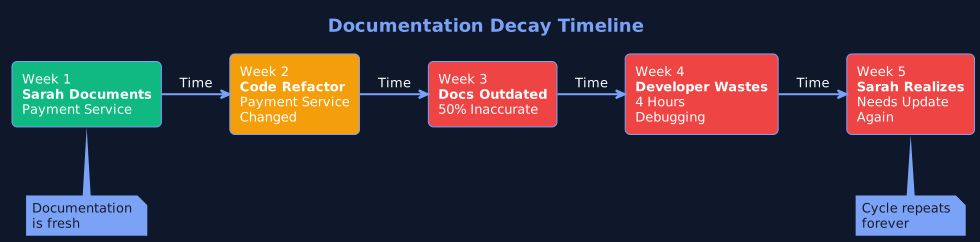 How quickly documentation becomes outdated without automation
The math:
- 50 code changes per week
- Each potentially affects documentation
- 15-30 minutes per manual update
- 12-25 hours per week just maintaining docs
Sarah’s feeling: “I feel like Sisyphus. Every time I finish documenting something, it changes. I’m on a treadmill that never stops.”
Challenge 4: Make Documentation Discoverable
The scattered reality:
- README files in each code repository
- Docs in Confluence (scattered across 20+ pages)
- Architecture diagrams in Google Drive
- Onboarding guide in Notion
- API docs in Swagger
- Tribal knowledge in Slack threads and senior developer brains
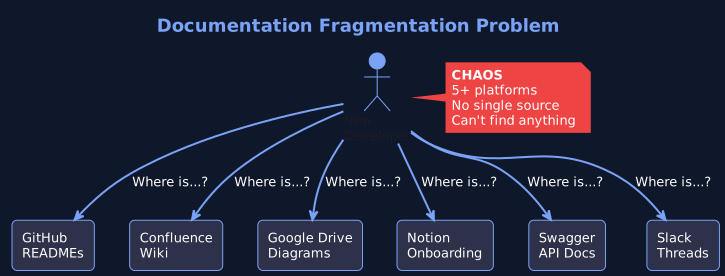 The typical documentation chaos across multiple platforms
New developers ask: “Where do I find this?”
- Wrong answer: “It’s in the wiki”
- Reality: “It might be in the wiki, or it might be in that Google Drive, or someone needs to explain it to you.”
Sarah’s exhaustion: “We have documentation scattered across five different platforms. Even I don’t know where everything is. And we’re duplicating information across all of them.”
Challenge 5: Keep Everything Consistent
The problem:
- 8 developers, 8 different writing styles
- Some services beautifully documented, others barely mentioned
- No standard format or template
- Quality varies wildly
- New developers don't know what to expect
Sarah’s frustration: “I’m trying to create standards, but getting buy-in is impossible. Developers are focused on shipping code, not maintaining documentation.”
Challenge 6: Handle Developer Onboarding
The painful reality:
- New developers join
- Documentation is incomplete and outdated
- Senior developers spend 2-4 hours per day explaining basic concepts
- Knowledge stays trapped in developer's heads
- When they leave, you lose that knowledge
Typical new developer week:
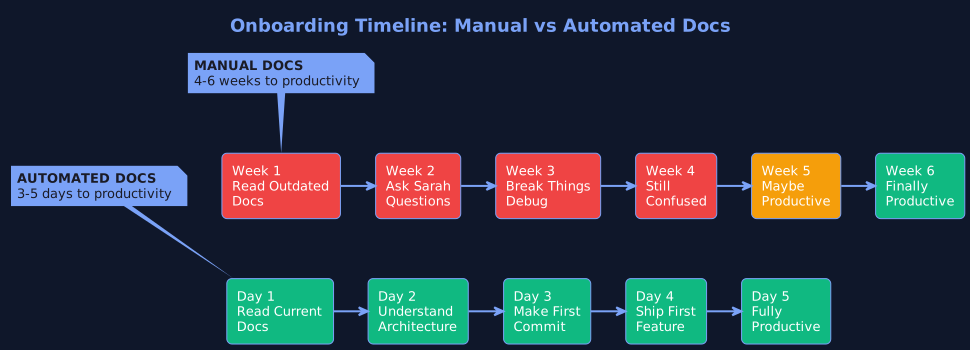 Current onboarding (weeks) vs. ideal onboarding (days)
| Current State (Manual Docs) | Impact |
|---|---|
| Day 1: "Read the onboarding docs in Notion" | Documentation last updated 8 months ago. Contains outdated architecture decisions. |
| Day 2: "Clone the repos and read the READMEs" | READMEs are minimal. Most just say "see the code." |
| Day 3: "Ask Sarah how the payment flow works" | Sarah spends 2 hours explaining. Now Sarah's behind on her own work. |
| Day 4: "Try to make a change, break something" | Undocumented dependency. Undocumented edge case. Undocumented because Sarah hasn't gotten to that part yet. |
| Week 2: "Still confused about architecture" | Diagrams don't match current code. Descriptions are vague. |
Time to productivity:
- Current: 3-6 weeks
- Should be: 3-5 days
Sarah’s reality: “I spend 20% of my time explaining things that should be documented. But when I try to document them, they’re outdated before the month ends. It’s a losing game.”
Challenge 7: Accept That Docs Will Get Outdated
The pragmatic nightmare: Most teams eventually accept: “Documentation will always be incomplete and outdated. That’s just how it is.”
The actual cost:
- Slow onboarding (2-3 months instead of 3-5 days)
- Senior developers spend 15-20 hours per month explaining basics
- Knowledge silos (only Person X understands Service Y)
- Bugs from misunderstanding architecture
- Repeat mistakes because lessons aren't documented
- Employee frustration and turnover
- Lost institutional knowledge
Sarah’s resignation: “This is where we are. And it’s costing us real time and frustration. We keep hiring consultants because critical knowledge isn’t documented. We onboard slowly. We make the same mistakes twice. And there’s nothing I can do about it—not without working 80-hour weeks.”
Why Manual Documentation Always Fails
Here’s the fundamental problem: Documentation can’t keep pace with code.
The Physics of the Problem
 The velocity gap between code changes and manual documentation updates
| Code Velocity: Fast | Documentation Velocity: Slow |
|---|---|
| • Developers commit code multiple times per day | • Requires understanding the code first |
| • Changes happen instantly (git push) | • Requires writing clear explanations |
| • System evolves rapidly | • Takes 10-15 hours per service minimum |
| • Speed is a competitive advantage | • Manual process prone to errors |
| The gap widens every day | |
Within weeks, documentation is stale. Within months, it’s completely inaccurate.
Why This Matters
Outdated documentation is worse than no documentation.
With no docs, developers know to ask for help or read the code. With outdated docs, they follow incorrect instructions, introduce bugs, and waste hours debugging problems that wouldn’t exist if docs were current.
Sarah realized this the hard way. She spent 180 hours documenting. But because the docs go stale within weeks, those 180 hours delivered almost no lasting value.
The opportunity cost is staggering. Those 180 hours could have been:
- 2-3 major features shipped
- Dozens of bugs fixed
- Performance improvements deployed
- Actual value delivered to customers
Instead, Sarah created documentation that’s already outdated.
The Time Cost: What Sarah Actually Lost
Let’s quantify Sarah’s situation in terms of time spent vs. time saved.
Sarah’s Time Investment
| Task | Time Spent |
|---|---|
| Documenting 4 services (of 12 total) | 120 hours |
| Creating diagrams | 30 hours |
| Updating outdated docs | 30 hours |
| Total over 3 months | 180 hours |
| Result: 30% complete, 50% already outdated | |
What Those 180 Hours Cost
In engineering productivity:
| 180 hours = 4.5 weeks of work | |
| Could have shipped: | 2-3 major features |
| Could have fixed: | 50+ bugs |
| Could have improved: | Performance, security, reliability |
Ongoing Maintenance Time
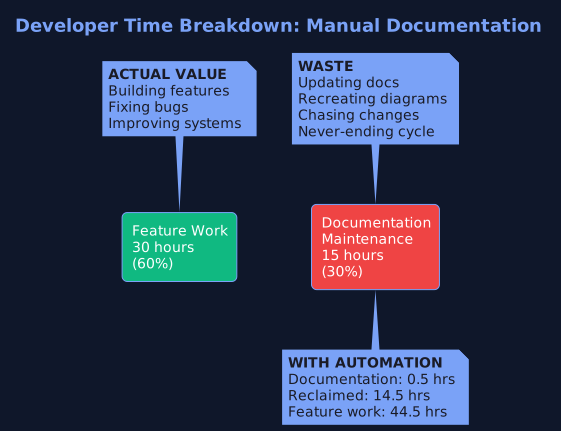 Where developer time goes: Feature work vs. documentation maintenance
Keeping documentation current requires:
| Activity | Time Per Week |
|---|---|
| Reviewing code changes for doc impacts | 5-8 hours |
| Updating outdated documentation | 6-10 hours |
| Recreating diagrams | 2-4 hours |
| Coordinating with other developers | 2-3 hours |
| Total maintenance per week | 15-25 hours |
| That's 1-2 hours per developer per week (10 developers) | |
New Developer Onboarding Time
| Metric | Current State (Outdated Docs) | What It Should Be (Current Docs) | |
|---|---|---|---|
| Time to productivity | 4-6 weeks | 3-5 days | |
| Lost productivity per hire | 200 hours | 24-40 hours | |
| Senior dev time spent explaining | 40-60 hours | 5-8 hours | |
| Time wasted on outdated info | 20-30 hours | 0 hours | |
| Total time waste per hire | 160-180 hours | Could save 140-150 hours per hire | |
With 5 new hires per year: That’s 700-750 hours saved annually
The Real Total Time Impact
Sarah’s team (20 developers):
| Category | Time Lost (Annually) |
|---|---|
| Sarah's initial documentation effort | 180 hours (one-time) |
| Ongoing maintenance (15-25 hrs/week) | 780-1,300 hours/year |
| Slow onboarding (5 hires × 140-150 hrs) | 700-750 hours/year |
| Knowledge loss when people leave | 80-150 hours/year |
| Year 1 Total Time Lost | 1,740-2,380 hours |
| That's nearly 1-1.5 full-time engineers doing nothing but documentation maintenance | |
Current Solutions (And Why They Fall Short)
Sarah explored every option. They all disappointed.
Option 1: Write Documentation Manually
This is what Sarah’s doing.
Pros:
- Full control over content
- Can add context and nuance
- Tailored to your specific needs
Cons:
- Incredibly time-consuming (120-180 hours for basic docs)
- Goes stale within weeks
- Ongoing maintenance is a never-ending treadmill
- Doesn't scale as codebase grows
- Takes time away from actual feature work
Time impact: Sarah spent 3 months and still isn’t done. Docs are already outdated.
Verdict: Fails at scale.
Option 2: Use Documentation Generators (JSDoc, Javadoc, Swagger)
Tools like:
- JSDoc for JavaScript
- Javadoc for Java
- Swagger/OpenAPI for APIs
- Sphinx for Python
- Doxygen for C++
Pros:
- Faster to generate than manual
- Stays closer to actual code
- Works well for API documentation
Cons:
- Limited to code comments — only documents what's commented
- No visual diagrams — no architecture, sequence, or flow diagrams
- No high-level context — explains HOW code works, not WHY
- Still requires manual updates — developers must update comments
- Doesn't explain business logic
- Only as good as comments — garbage in, garbage out
Sarah’s experience: “We use JSDoc for our JavaScript services. It generates API docs automatically, which is great. But it doesn’t show how services interact. It doesn’t create architecture diagrams. It’s 10% of the solution.”
Verdict: Works for APIs, fails for comprehensive documentation.
Option 3: Hire Technical Writers
The professional approach.
Pros:
- Dedicated resource
- Professional documentation quality
- Can create comprehensive guides
Cons:
- Technical writers don't understand code deeply — they need developers to explain it
- Creates a bottleneck — everything goes through one person
- Still goes stale — technical debt continues to accumulate
- Doesn't solve synchronization — code still changes faster than docs
- Doesn't scale — one writer per 10-20 engineers
Time impact: Technical writers still need 20-40 hours of developer time per month for explanations and reviews.
Verdict: Expensive, doesn’t fundamentally solve the problem.
Option 4: “Document as You Go”
The theory: Developers document code as they write it, keeping documentation up-to-date naturally.
The reality:
- Developers are under deadline pressure to ship features
- Documentation is always "I'll do it later" (it never happens)
- When it does happen, quality is inconsistent
- It still goes stale as code evolves
- No enforcement mechanism
Sarah’s experience: “We tried this. It doesn’t work. Developers are under pressure to ship. Nobody documents. Documentation is always outdated. Or never written.”
Verdict: Sounds good in theory, fails in practice.
Option 5: Accept Incomplete Documentation
The resigned approach: Just accept that documentation will always be incomplete and outdated.
The time cost:
- New developers take 3-6 weeks to onboard (instead of 3-5 days)
- Senior developers spend 20% of time explaining (15-20 hours/month)
- Knowledge silos form (only Person X understands Service Y)
- Bugs from architectural misunderstanding
- Institutional knowledge lost when people leave
- Employee frustration and higher turnover
- Repeated mistakes
Sarah’s reality: “This is where we’ve landed. And it’s costing us real time and productivity.”
Verdict: Pragmatic but expensive in time and morale.
Enter Agentic Documentation
What if documentation could update itself?
What if it wasn’t a manual process, but an autonomous system?
This is where Agentic AI changes everything.
The Problem With Every Solution Above
They all assume documentation is a manual process:
- Manual writing
- Manual updates
- Manual synchronization
- Manual maintenance
What if it didn’t have to be?
How Agentic Documentation Works
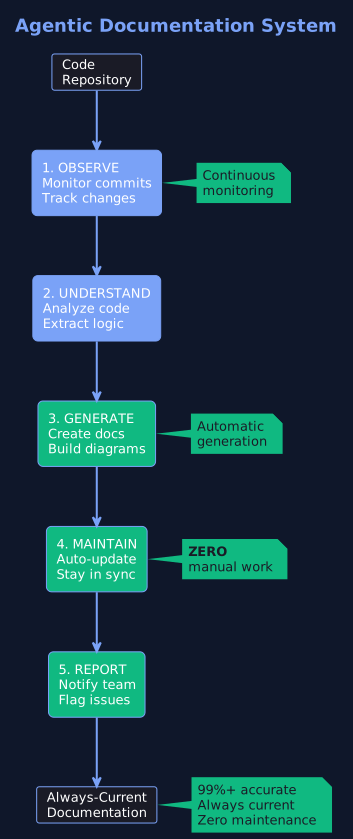 Autonomous documentation system that observes, understands, generates, and maintains docs automatically
Agentic documentation uses autonomous AI agents that:
1. Observe
- Continuously monitor your code repository
- Track every commit and change
- Understand what changed and why
2. Understand
- Analyze code to extract business logic
- Parse architecture and dependencies
- Understand patterns and relationships
3. Generate
- Automatically create documentation
- Generate multiple diagram types
- Create API documentation
- Extract and explain complex flows
4. Maintain
- Automatically update when code changes
- Keep docs in sync with reality
- No human intervention needed
- Zero manual maintenance
5. Report
- Flag potential documentation issues
- Notify teams of significant changes
- Enable human oversight
Why This Is Different
| Traditional Tools | Agentic Documentation |
|---|---|
| Documentation = manual task | Documentation = automated process |
| Updates = manual task | Updates = happen automatically |
| Synchronization = impossible | Synchronization = always current |
| Time required = 15-25 hrs/week | Time required = 0.5 hrs/week |
Sarah’s reaction: “Wait, you’re telling me the documentation could update itself? Without me manually rewriting it every time code changes?”
Exactly.
How Dockr Solves Sarah’s Problem
Dockr is an AI-powered documentation platform built on agentic principles.
Sarah’s New Workflow
Day 1: Connect Your Repository
Sarah connects Dockr to her GitHub repository. Takes 5 minutes.
Dockr immediately begins analyzing the codebase.
Day 2: Initial Documentation Generated
Dockr has automatically generated:
- Service descriptions (what each service does)
- Architecture diagrams (how services connect)
- API documentation (endpoints, parameters, responses)
- Data flow diagrams (how data moves)
- Dependency mapping (what talks to what)
- Database schema documentation
- And many more...
Sarah’s assessment: “This is 99% complete. It would have taken me 3 weeks to get to this point. I spent 2 hours reviewing. Done.”
Time saved: 118 hours (120 hours → 2 hours)
Weekly: Code Changes, Docs Update Automatically
Day 8: A developer commits code
The developer refactors the Payment Service. Pushes code to main branch.
What happens automatically:
- Dockr detects the change
- Analyzes the modified code
- Updates relevant documentation
- Regenerates affected diagrams
- Flags Sarah for review (if needed)
Sarah’s review: 5 minutes to scan changes, approve
Time saved: 2-3 hours per update (manual) → 5 minutes (automated)
Month 1: New Developer Onboarding
New engineer joins the team.
Instead of:
- Waiting for Sarah to explain everything (2-4 weeks)
- Reading scattered, outdated documentation
- Making mistakes from misunderstanding
- Asking questions constantly
With Dockr:
- Access comprehensive, current documentation
- Visual diagrams showing architecture
- APIs clearly documented
- Service interactions explained
Result: New developer productive in 3-5 days (instead of 3-6 weeks)
Time saved per new hire: 140-150 hours
Sarah’s comment: “This is magic. New team members now have everything they need without asking me a hundred questions.”
The Transformation
Sarah’s stats after switching to Dockr:
| Metric | Before Dockr | With Dockr |
|---|---|---|
| Documentation creation | 120+ hours | 2 hours |
| Monthly maintenance | 60-100 hours | 2 hours |
| Documentation accuracy | 50% accurate | 99%+ accurate |
| New developer onboarding | 3-6 weeks | 3-5 days |
| Sarah's time reclaimed | - | 15-20 hours/week |
What Sarah does with reclaimed time:
- Ship features (actual value for customers)
- Improve performance
- Fix technical debt
- Lead architecture improvements
- Focus on actual engineering
Sarah’s reflection: “I finally feel like I’m doing what I was hired for. Building things. Not writing documentation.”
The Time Comparison: Manual vs. Automated
| Task | Manual | Dockr (Automated) |
|---|---|---|
| Initial Documentation | ||
| Analyze 12 services | 120 hours | Automated (0 hours) |
| Create diagrams | 30 hours | Automated (0 hours) |
| Write descriptions | 40 hours | Automated (0 hours) |
| Manual review & edit | 20 hours | 2 hours |
| Total Time | 180 hours | 2 hours |
| Time saved: 178 hours (99% reduction) | ||
| Monthly Maintenance | ||
| Monitor code changes | 10 hours | Automated (0 hours) |
| Update outdated docs | 15 hours | Automated (0 hours) |
| Fix diagram errors | 5 hours | Automated (0 hours) |
| Review changes | - | 0.5 hours |
| Total/Month | 30 hours | 0.5 hours |
| Time saved: 29.5 hours/month (98% reduction) | ||
| Annual Impact | ||
| Annual maintenance | 360 hours | 6 hours |
| New hire onboarding (5 hires) | 700-750 hours wasted | ~0 hours wasted |
| Total Annual Time Saved | 1,050-1,100 hours | |
| That's equivalent to adding a half-time engineer without hiring | ||
The Pattern of Success
Organizations that succeed with documentation automation don’t treat it as a nice-to-have.
They treat it as a strategic investment in developer productivity.
What Successful Organizations Do:
- Recognize documentation as a continuous process, not a one-time task
- Invest in automation to eliminate manual toil
- Free developers to focus on high-value work
- Accelerate onboarding from weeks to days
- Reduce knowledge silos and dependencies
- Build institutional knowledge that persists
- Create a culture of documentation excellence
Your Action Plan
This Week
| This Month
| This Quarter
|
Which Challenge Are You Facing?
Sarah’s story is the story of thousands of developers.
The key is recognizing that manual documentation will always fail at scale.
Need Help Solving This?
FLYTEBIT Technologies built Dockr—an AI-powered documentation platform that automatically generates and maintains your code documentation.
Dockr helps you:
- Generate comprehensive documentation in hours, not months
- Keep docs automatically synchronized with code changes
- Create visual diagrams that update themselves
- Accelerate onboarding from weeks to days
- Reclaim 15-20 hours per week per senior developer
- Build institutional knowledge that persists
Ready to get started?
- Request a Demo: dockr.flytebit.com
- Visit us at: flytebit.com
- Follow FLYTEBIT TECHNOLOGIES on LinkedIn for insights and updates
- Schedule a free consultation to discuss your documentation challenges
Related Reading
Understand the broader AI implementation landscape:
👉 The 6 Biggest AI Implementation Mistakes (And How to Avoid Them)
Learn from common mistakes when implementing AI systems in your organization.
Understand how AI agents work:
👉 How AI Agents Actually Work: A Technical (But Accessible) Guide
Dive deep into the technical architecture of AI agents and how they autonomously generate and maintain documentation.
Key Takeaways
- ✅ The Problem: Documentation can't keep pace with code velocity
- ✅ The Cost: 1,000+ hours wasted annually on manual documentation
- ✅ Current Solutions: All require manual effort and still fall behind
- ✅ The Solution: Agentic documentation that updates automatically
- ✅ The Impact: 99% time reduction + always-current docs + faster onboarding
Success pattern: Automate + Always Current + Developer Time Reclaimed + Faster Onboarding + Institutional Knowledge

Ready to Transform Your Business with AI?
Let's discuss how Agentic AI and intelligent automation can help you achieve your goals.
Schedule a Free Consultation