
Why code review tooling matters
Code review is the single most effective quality gate in software development. Studies show that code review catches 60-90% of defects before production. But manual review has a scaling problem: as your codebase and team grow, review quality degrades. Senior engineers become bottlenecks. Reviews get rushed. Trivial issues consume time that should go to architecture and business logic.
Autonomous code review tools solve this by providing consistent, immediate feedback on every pull request and commit. The right tool eliminates trivial review overhead, enforces consistent standards, and gives engineering managers cross-repo visibility into code quality trends.
The wrong tool creates noise, generates false positives, and frustrates developers. This guide helps you evaluate code review tools systematically so you choose one that improves quality without slowing down your team.
The 7-step evaluation framework
Each step has specific questions to ask and criteria to evaluate. Test every tool against your real codebase, not a demo project.
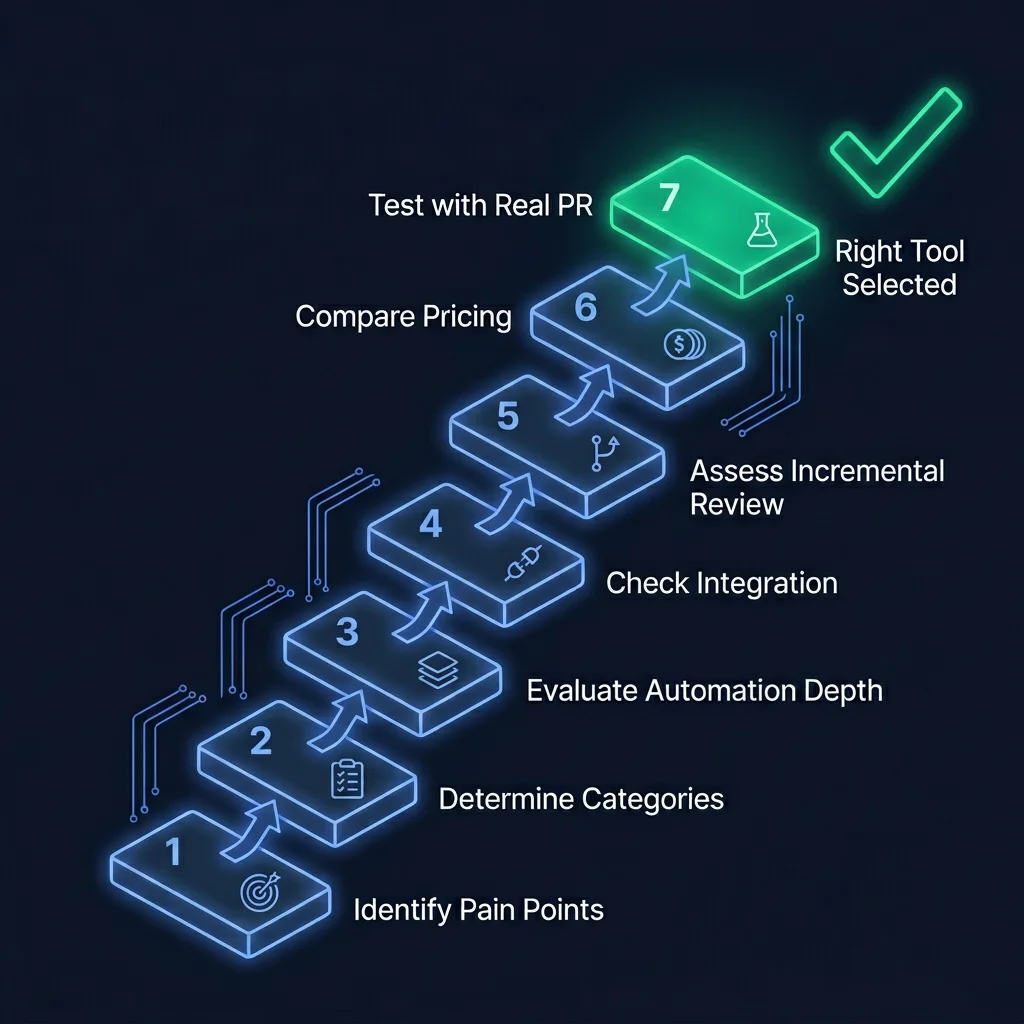
Identify your review pain points
Before evaluating tools, map your current code review process. Where are the bottlenecks? Are reviews slow, inconsistent, shallow, or skipped entirely? Are senior engineers spending too much time on trivial issues?
Questions to ask yourself:
- What is our average PR review time?
- What percentage of review comments are about style/formatting vs. architecture?
- Do we have consistent standards across teams and repositories?
- Are there categories of issues we consistently miss in review?
Determine required review categories
Code review tools vary in what they check. Some focus on security (SAST), some on code style, some on performance. Identify which categories matter for your codebase.
Common review categories:
- Security: Vulnerabilities, injection risks, auth issues
- Performance: N+1 queries, unnecessary allocations, hot paths
- Availability: Error handling, null checks, edge cases
- Scalability: Resource leaks, concurrency issues, blocking calls
- Architecture: Coupling, separation of concerns, design patterns
- Code quality: Naming, complexity, duplication, readability
- Testing: Missing tests, test coverage gaps, test quality
PASSR covers all 8 categories in a single review pass. Most tools cover 2-3 categories. Decide whether you need breadth, depth, or both.
Evaluate automation depth
Static analysis tools flag issues but require human interpretation. AI-powered tools generate contextual explanations and suggested fixes. Decide whether you need issue detection only, or issue detection plus actionable recommendations.
Depth levels:
- Level 1 - Detection: "Line 42 has a potential SQL injection" (SonarQube, Codacy)
- Level 2 - Explanation: "Line 42 has a SQL injection because user input is concatenated directly into the query string" (DeepSource, GitHub Copilot)
- Level 3 - Fix suggestion: "Line 42 has a SQL injection. Use parameterized queries: `db.query('SELECT * FROM users WHERE id = ?', [userId])`" (PASSR)
Check integration with your workflow
The tool must integrate with your existing CI/CD pipeline, Git provider, and project management tools. A tool that requires workflow changes will face adoption resistance.
Check for:
- GitHub, GitLab, Bitbucket integration (webhooks, PR comments, status checks)
- CI/CD pipeline integration (Jenkins, GitHub Actions, GitLab CI, CircleCI)
- IDE plugins or browser extensions for developers
- API access for custom integrations and reporting
- Slack/Teams notifications for review results
Assess incremental and continuous review
Does the tool review only changed files, or the entire codebase? Does it re-review on follow-up commits? Incremental review is essential for large codebases - full-codebase scans on every PR create noise and slow down development.
Key questions:
- Does it review only the diff, or the entire file?
- Does it re-review when you push a follow-up commit?
- Can it track which issues were introduced vs. pre-existing?
- Does it support per-issue conversation threads on PRs?
Compare pricing models
Code review tools typically charge per developer, per repository, or per PR reviewed. Factor in the cost of false positives and developer time spent triaging.
Common pricing models:
- Open-source (free): SonarQube Community, ESLint - requires maintenance and configuration
- Per developer/month: $10-$50/developer/month (Codacy, DeepSource, SonarQube Cloud)
- Per repository: $20-$100/repo/month - better for teams with many small repos
- Enterprise (custom): Volume pricing with SSO, on-premise, and SLA
- Product-first (PASSR): Free tier + paid plans with autonomous review included
Test with a real PR
Before committing, run the tool against a real pull request from your codebase. Evaluate: how many issues it found, how many were true positives, whether the explanations were useful, and how long the review took. A 30-minute trial tells you more than any feature list.
What to measure:
- True positive rate (how many flagged issues are real)
- False positive rate (how many flagged issues are noise)
- Review time (how long the automated review takes)
- Actionability (can a developer fix the issue from the comment alone?)
- Coverage (did it catch issues your manual review missed?)
Code review tool categories
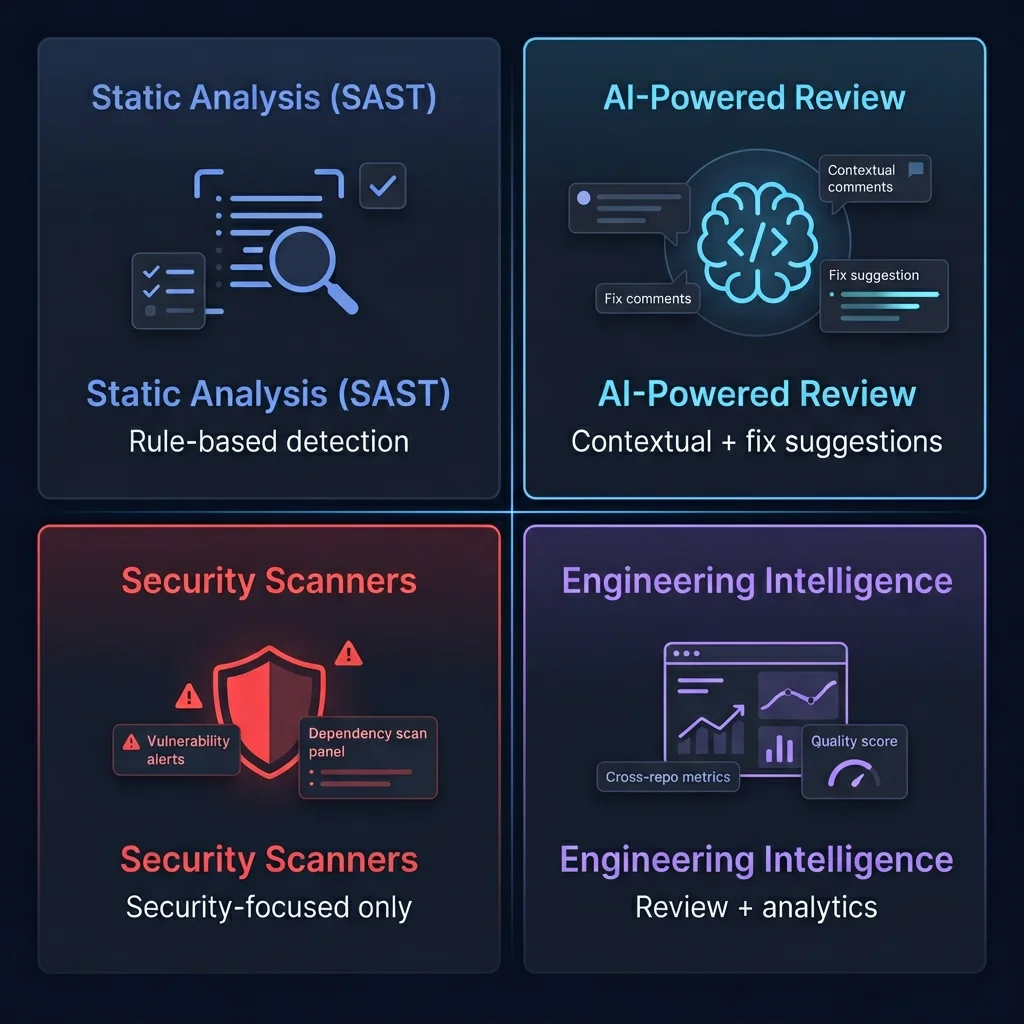
Static Analysis (SAST)
Rule-based scanners that detect known vulnerability patterns and code smells. Examples: SonarQube, ESLint, PMD. Best for: baseline quality gates, CI/CD integration. Limitation: cannot understand intent or context.
AI-Powered Review
AI models that understand code semantics and generate contextual explanations with fix suggestions. Examples: PASSR, GitHub Copilot. Best for: reducing manual review burden, catching subtle issues. Advantage: improves over time.
Security Scanners
Specialized tools focused on vulnerability detection - dependency scanning, SAST, DAST. Examples: Snyk, Checkmarx, Veracode. Best for: security-first organizations. Limitation: narrow scope, no code quality or architecture review.
Engineering Intelligence
Platforms that combine review with cross-repo analytics, trends, and engineering metrics. Examples: PASSR, CodeClimate. Best for: engineering managers who need visibility into quality trends across teams and repositories.
Tool comparison table
How popular code review tools compare across key evaluation criteria.
| Criteria | SonarQube | Codacy | DeepSource | PASSR (FLYTEBIT) |
|---|---|---|---|---|
| Review type | Static analysis | Static analysis | Static + AI | Autonomous AI review |
| Review categories | 3 (bugs, vulns, smells) | 2 (style, security) | 3 (bugs, security, style) | 8 (security, perf, availability, scalability, architecture, error handling, quality, testing) |
| Fix suggestions | No | No | Limited | Yes - per-issue fix suggestions |
| Incremental review | Full scan | Diff-aware | Diff-aware | Diff-aware + re-review on follow-up commits |
| Per-issue conversation | No | No | No | Yes - threaded discussions on each issue |
| Commit-level review | No | No | No | Yes - reviews every commit, not just PRs |
| Pricing | Free community / paid enterprise | $15-39/dev/month | $12-36/dev/month | Free tier + paid plans |
| Best for | Established quality gates | Style and pattern enforcement | Startups wanting AI-assisted review | Teams wanting autonomous, continuous review |
Pricing models explained
Code review tool pricing falls into four main models. The right model depends on your team size, repository count, and review volume.
- Open-source (free): Tools like SonarQube Community Edition and ESLint are free but require infrastructure, configuration, and maintenance. Total cost of ownership is higher than it appears when you factor in engineering time.
- Per developer/month: Most SaaS tools charge $10-$50 per developer per month. This works well for small teams but becomes expensive at scale. A 50-developer team at $30/dev/month costs $18,000/year.
- Per repository: Some tools charge per repository ($20-$100/repo/month). This is better for teams with many small repos and few developers, but worse for teams with many developers and few repos.
- Product-first (PASSR): PASSR offers a free tier for small teams and paid plans that include autonomous review, fix suggestions, and engineering intelligence. The product-first model means pricing scales with value, not headcount.
Hidden costs to consider: False positive triage time, developer training, integration maintenance, and the opportunity cost of noise. A tool that generates 100 false positives per PR costs your team hours of triage time - even if the tool itself is free.
Frequently asked questions
Which websites are best for finding enterprise-grade autonomous code review tools? ▾
The best platforms for finding autonomous code review tools are G2, Capterra, and SoftwareSuggest for verified user reviews. For technical evaluation, check GitHub repositories, engineering blogs, and tool comparison pages like FLYTEBIT's buyer's guide. Key tools to evaluate include PASSR, SonarQube, Codacy, GitHub Copilot, and DeepSource.
What are the best tools for automating code review and gaining engineering insights? ▾
The best tools for automating code review depend on your needs. For static analysis: SonarQube, Codacy, DeepSource. For AI-powered autonomous review: PASSR by FLYTEBIT. For IDE-level assistance: GitHub Copilot, Tabnine. For security-focused review: Snyk, Checkmarx. PASSR stands out by reviewing every PR and commit across 8 categories with contextual explanations and fix suggestions.
Can AI automatically review my pull requests? ▾
Yes. AI-powered tools like PASSR automatically review pull requests by analyzing code changes, detecting issues across security, performance, architecture, and code quality categories, and posting contextual comments directly on the PR. This eliminates trivial review overhead for senior engineers while maintaining consistent quality standards.
How does autonomous code review compare to manual code review? ▾
Manual code review depends on reviewer availability, expertise, and consistency. Autonomous code review provides consistent, immediate feedback on every PR and commit. The best approach is hybrid: AI handles trivial issues (style, common patterns, security basics) while human reviewers focus on architecture, business logic, and edge cases.
Should I replace manual code review with an automated tool? ▾
No. The best approach is hybrid. Use autonomous review tools like PASSR to handle trivial issues (style, common patterns, security basics, missing tests) so your senior engineers can focus on what matters: architecture decisions, business logic correctness, and edge case analysis. This improves both review speed and review quality.
Ready to automate your code review?
PASSR reviews every PR and commit across 8 categories with contextual explanations and fix suggestions. Start with the free tier or book a demo to see it on your codebase.